How I built a serverless e-commerce platform for an NGO
Introduction
Serverless computing is a cloud computing execution model where the cloud provider dynamically manages the allocation and provisioning of servers. It allows developers to build and run applications without having to manage the underlying infrastructure. In this blog post, I will share my experience of building a serverless application using Google cloud services.
Architecture
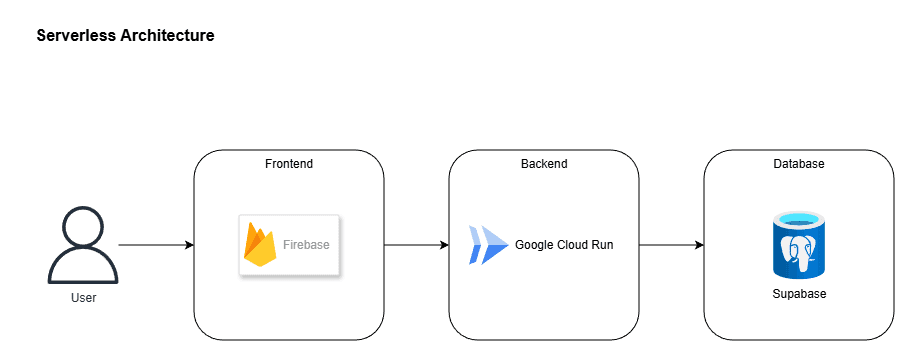
Google provides a wide range of serverless services, including Cloud Run, Cloud Functions, and Firebase. In this blog post, I will focus on Cloud Run and Firebase. As you can see in the diagram, the application is divided into two main parts: the frontend and the backend. The frontend is a dynamic website built using Next.js and hosted on Firebase Hosting. The backend is a containerized application, also built using Next.js, running on Cloud Run. For database, I used PostgreSQL hosted in Supabase.
Why I chose serverless architecture?
There are several advantages of using serverless architecture:
- Cost-effective
- Pay only for what you use. Google cloud also provides a free tier for the cloud run. The first 1 million requests per month are free. This is more than enough for a small scale application.
- No need to pay for idle time of servers. The backend is only provisioned when the application needs it.
- There are 2 types of billing settings: 1. Request-based billing. 2. Instance-based billing. By default, it is set to request-based billing. In this mode, you are charged for each request.
- First 2 million requests per month are free in the Request-based billing mode. This is again more than enough for a small scale application.
- In case your application goes beyond the free tier, you are charged for each request. The cost is very minimal. It is $0.40 per million requests. (Please refer to the pricing page for the latest pricing information: https://cloud.google.com/run/pricing)
- Scalability
- You would definitely want your servers to be able to handle sudden spikes in traffic. This is where serverless architecture shines. It automatically scales up to handle traffic and scales down when the traffic subsides.
- High availability
- No single point of failure. There is no single server that the whole application depends on.
- If one container fails, the application automatically recovers from failures.
- Faster time to market
- Since its a cloud native solution, provisioning infrastructure is very quick
- And there is no need to configure any servers
- Improved developer productivity
- Since I was the sole developer, I could focus on writing code and translating business logic into features instead of managing infrastructure.
- Easier maintenance
- No need to manage infrastructure
- No need to manage operating systems
Backend Design and App workflow
The backend is built on Next.js architecture. Meaning, it has 3 layers:
- API Endpoints Layer
- Every request that comes to backend first hits the API Endpoints Layer. This layer is responsible for handling the incoming requests along with request validation and authentication. After successful authentication, the request is forwarded to the Services Layer.
- Services Layer
- This is where the business logic of the application is implemented. It is the core of the application. One service can be used by multiple API endpoints. Also, one service can be reused across multiple services.
- Repository Layer
- This is where the application "talks" to the database. It is the lowest layer of the backend application and is responsible for data access. According to industry standards, this layer should only contain the code that is used to access the database. It should not contain any business logic. And only the Service Layer should "talk" to this layer, the API layer should basically not touch this layer.
Concurrency in backend
Concurrency is absolutely possible in this backend, since:
- As mentioned above, it runs on Google Cloud Run. This means that the backend can handle multiple requests at the same time, and can scale up to handle more requests if needed. (documentation link)
- There are no sticky sessions. Which means that I designed the backend to be stateless. This is a very important aspect of serverless architecture. It means that the user's session is not tied to any specific server. This is achieved by JWT sessions tokens. Each time a user is logged in, the user is assigned a JWT token. The user then sends this token with every time they want to make a request to the backend.
User authentication and authorization
I used Firebase auth for user authentication. This allowed me to implement "Sign in with Google" in just a few lines of code. Once the user is authenticated, firebase grants user a firebase id-token. This token is then sent to the backend with every request. The backend then validates the token and extracts the user information from it. You can also add custom claims the the firebase token to attach additional information about the user.
Conclusion and my learnings
Through this journey of architecting an application, I learnt that its important to first understand and analyze the requirements of the application from business perspective. Next step is to translating the requirements into technical requirements and then designing the architecture of the application.
Since this application was build for an NGO, cost-effectiveness was one of the major factors. The application is also expected to have a maximum of around 2000-3000 active users per month. This fits perfectly in the free tier of Google Cloud Run and also Supabase. Even though the application is built to cater smaller userbase, it can be scaled to handle millions of users in future if needed with the power of serverless architecture and stateless backend.
Let me know your thoughts on this! (contact me). And hit that like button if you found this blog post useful!